Search the web:

Showing posts with label Freeware. Show all posts

MyFolder Free Version

Friday, June 19, 2009

 MyFolder_Free_250

Click on a folder with the right button of the mouse and change the folder icon by My Folder. By clicking right button of the mouse on the folder; you can reach all the galleries those defined submenu under Horizon Myfolder Menu. Appearance of the any icons listed can be changed. Changing shape and color of the folders makes easier and faster Windows. Appearance of the folders is up to your choice by My Folder. Customize your computer by My Folder. Resetting and getting back to original icon is possible. Adding new icon and changing the look of the folders are possible. Folder icons can be stored as many as wanted under My Folder gallery section. You can create particular icon library and control the icons by My Folder. Icons defined in My Folder library can be transferred to the galleries in gallery section. My Folder provides adding folders with dll. exe. and icl. extensions to the library. Icon in library can be sent to gallery and used there.
Gallaries in My Folder. Colors.Levels, Project Galleries. Easy to use, Accelerates the process. Folder organizing is quicker.

My Folder Free Galleries
    * Colors
    * Event
    * Level
    * Priority
    * Project

Download it Here

Check out this new way of showing your Flickr Pics

Sunday, March 8, 2009

If you like, you can now try the Flickr widget I found on the internet. On the webpage you can enter your Flickr feed, along with some other details, and create your personalized version of the widget. It’s generates an HTML code snippet that you can copy-paste into your website. In fact I just used it to create the widget embedded on the left.

Via: Roy Tanck’s Blog

Multi partition a USB flash drive in Windows

Saturday, March 7, 2009

usb-flash-drive13

Ever wondered how to set up more than one partition on a USB flash drive using Windows XP? In the following tutorial, I'll show you how to do just that. But first, let me explain how it works. By default, a USB flashdrive is detected by Windows XP/Vista as removable media and thus will not display more than one partition. In addition, Windows will not allow you to multi partition removable media. However, if we can make Windows see the USB flashdrive as a fixed drive, Windows will then allow us to create multiple USB flashdrive partitions. Windows will also detect and display those multiple USB flashdrive partitions.

In order for this to happen, we need to flip the Removable Media Bit (RMB) on the USB Device. This will tell Windows that the flashdrive is a fixed disk and not removable media. After successfully flipping the bit, you'll be able to multi partition the flashdrive and Windows will display all partitions.

How to Flip the Flashdrive Removable Media Bit:

Warning: This tool will not work on all flashdrives and it could potentially mess up your drive. No warranty is being offered, USE AT YOUR OWN RISK! backup all information from your USB device before proceeding.

  1. Download the BootIt tool and extract to your PC
  2. Plugin your flashdrive and run BootIt.exe
  3. Select the option to Flip Removable Bit:

boot-it

  1. Then, remove and reinsert your flashdrive. Your flashdrive should now be detected by Windows as a fixed disk (not a removable disk). You can check this by right clicking the device and checking the device properties

How to setup multiple flashdrive partitions in Windows:

The following assumes that you have already Flipped the Removable Media Bit

  1. Navigate to Start -> Run and type diskmgmt.msc in the dialog box then click Ok
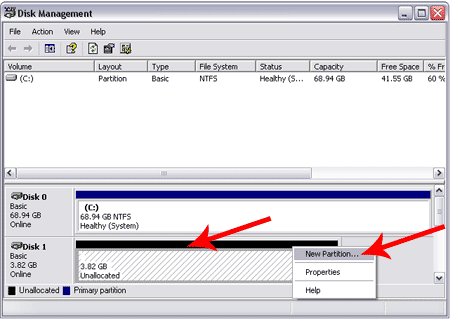
  2. From the disk management window, right click your flashdrive and select the option to Delete Partition:

    delete-partition
  3. Right Click your flashdrive again and select the New Partition option:
    new-partition
  4. Follow the New Partition Wizard and create a "Primary Partition". Once you get to the dialog box to set the Partition Size, be sure to set the Size to be smaller than the drives capacity to leave free space for the next partition:
    partition-size
  5. Continue through the Wizard, giving your device a drive letter and formating the partition. I recommend a Fat32 partition.
  6. After you have created the first partition, you can create additional partitions using step 3-5 on the unallocated empty space that remains on the drive:
    remaining-partitions
  7. Once finished, you should have multiple partitions on your USB flash drive that are detected and usable in Windows as separate drives:
    multiple-flashdrive-partitions 

Enjoy!!!

Stellarium – a Free Planetarium for your computer

Tuesday, February 17, 2009

Stellarium is a free open source planetarium for your computer. It shows a realistic sky in 3D, just like what you see with the naked eye, binoculars or a telescope.
It is being used in planetarium projectors. Just set your coordinates and go.

rotate

Features:

SKY:
  • default catalogue of over 600,000 stars
  • extra catalogues with more than 210 million stars
  • asterisms and illustrations of the constellations
  • constellations for eleven different cultures
  • images of nebulae (full Messier catalogue)
  • realistic Milky Way
  • very realistic atmosphere, sunrise and sunset
  • the planets and their satellites
Interface:
  • a powerful zoom
  • time control
  • multilingual interface
  • fisheye projection for planetarium domes
  • spheric mirror projection for your own low-cost dome
  • all new graphical interface and extensive keyboard control
  • telescope control
Visualisation:
  • equatorial and azimuthal grids
  • star twinkling
  • shooting stars
  • eclipse simulation
  • skinnable landscapes, now with spheric panorama projection
Customisability:
  • add your own deep sky objects, landscapes, constellation images, scripts...

Download Now

Autologon for Windows v2.10

Autologon enables you to easily configure Windows’ built-in autologon mechanism. Instead of waiting for a user to enter their name and password, Windows uses the credentials you enter with Autologon, which are encrypted in the Registry, to log on the specified user automatically.

Autologon is easy enough to use. Just run autolog.exe, fill in the dialog, and hit Enable. To turn off auto-logon, hit Disable. If the DefaultPassword is NULL, autologon will only occur once and then be disabled. Also, if the shift key is held down before the system performs an autologon, the autologon will be disabled for that logon. You can also pass the username, domain and password as command-line arguments: autologon user domain password.

Runs on:

  • Client: Windows XP and higher.
  • Server: Windows Server 2003 and higher.

Download Now

Desktops v1.0 – Create upto Four Virtual Desktops

cc817881_desktops2(en-us,MSDN_10)

Introduction

Desktops allows you to organize your applications on up to four virtual desktops. Read email on one, browse the web on the second, and do work in your productivity software on the third, without the clutter of the windows you’re not using. After you configure hotkeys for switching desktops, you can create and switch desktops either by clicking on the tray icon to open a desktop preview and switching window, or by using the hotkeys.

Using Desktops

Unlike other virtual desktop utilities that implement their desktops by showing the windows that are active on a desktop and hiding the rest, Sysinternals Desktops uses a Windows desktop object for each desktop. Application windows are bound to a desktop object when they are created, so Windows maintains the connection between windows and desktops and knows which ones to show when you switch a desktop. That making Sysinternals Desktops very lightweight and free from bugs that the other approach is prone to where their view of active windows becomes inconsistent with the visible windows.

Desktops reliance on Windows desktop objects means that it cannot provide some of the functionality of other virtual desktop utilities, however. For example, Windows doesn't provide a way to move a window from one desktop object to another, and because a separate Explorer process must run on each desktop to provide a taskbar and start menu, most tray applications are only visible on the first desktop. Further, there is no way to delete a desktop object, so Desktops does not provide a way to close a desktop, because that would result in orphaned windows and processes. The recommended way to exit Desktops is therefore to logoff.

Runs on:

  • Client: Windows XP and higher.
  • Server: Windows Server 2003 and higher

Download Now

Windows Addon : Shell Objects Editor

Thursday, February 12, 2009

My-Choice This program is an editor for shell objects. You can create new shell objects and delete them when you don't need or want them any longer. For safety reasons, it is not possible to delete shell objects that were not created with this editor by default. You have to switch to "expert mode" to delete other shell objects.
240x180_explorer1

What is a shell object?
The "My Documents" folder is a shell object. It is a special shell object, a shell folder. Shell folders are not real folders on your hard disk, they only refer to real folders. They are a kind of "hard links", a special type of shortcuts.
Ok, you can use shortcuts to hard disks or you can use shortcuts to directories on your desktop to access places on your hard disk you often need to access. But you can't browse them that easy, shell folders are much easier to use.
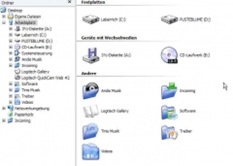
The screenshot shows some shell folders on a Windows XP system. You can browse through their subdirectories on the left side of the view, or you can double-click on the right side. They behave in the exact same way as the "My Documents" folder. With the shell object editor, you can create as many of those shell folders as you want, although we recommend only choosing the folders you use most.
But there are more shell objects. The Internet Explorer, that resides on your desktop by default, is a shell object, too. It is not a shortcut because it has not the typical shortcut arrow. The Internet Explorer is a delete-able shell object, but you can create shell objects that are impossible to delete. This may sound like nonsense to you, but it is useful in some rare cases and such objects can be created with this editor.

Installation
Download the installer and run it. A program group will be created and optionally an icon in your control panel.
When you run the program, a list will appear that is initially empty. It will contain all the shell objects that you create with this editor later. Click the "Create" button to start the wizard which will guide you through the creation process.
If you select one or more shell objects in the list, clicking the delete button will be remove the shell objects immediately. Shell objects that were created by other programs, by the system or by yourself (using the registry editor) do not show up here for safety reasons. This way you can't trash your system by just clicking the wrong item.
However, if you right-click in the list and select "expert mode", all existing shell objects will appear in the list and you are then able to delete some of them - even the control panel or things like that. You have been warned.

Attention
Note that this program uses some undocumented registry entries to do what it does. You are completely on your own with whatever the results may be. We tried the program on different computers and it works and does no harm, but we don't guarantee anything. We are in no way responsible for the results.

So the annoying desktop icons cannot bother you any more. If you were also missing the “My Documents” icon on the desktop of Windows Vista you can tweak the settings and have it the way you want it to be.

Download Now

Google Maps for your Nokia S60 phone

Thursday, February 5, 2009

maps-48x48Download Google Maps for mobile to your Nokia phone, and never carry a paper map again. Google Maps on your phone makes it easy to:

  • Determine your current location with or without GPS
  • Get driving and transit directions
  • Get phone numbers and addresses for local businesses
My Location (beta)

My Location shows your current location on the map, even if your Nokia phone does not have GPS.

Interactive maps

Google Maps for your Nokia feels just like Google Maps on the desktop. Pan and zoom the map, and view satellite imagery, and even switch into Street View for a closer look.

Business listings

Search Google Maps for local businesses and points of interest. View store hours and reviews, then dial a business in one click. Thanks to My Location, you can find nearby businesses without even having to enter your current location.

Directions

Google Maps offers turn-by-turn driving directions - and thanks to My Location, you don't even have to enter your starting point. You can also get walking directions and find public transit routes in more than 100 cities around the world.

Traffic

Real-time traffic data helps you find the fastest route to your destination.

New! Street View

View street level imagery of addresses, businesses, and turns in directions in major cities throughout the United States, Australia, Japan, and parts of Europe.

Favorites

Save your favorite places so that you can easily return to them on the map.

The latest version of Google Maps 3.0 is out

Download Now

Beautiful Hi-Tech Teenage Furniture

Wednesday, February 4, 2009

As you can see from this pictures this furniture combines 3 elements : beauty, comfort, and functionality, and is specially designed for the tech-savvy.

roberta_ramme_a

roberta_ramme_c

This multifunctional chaise-Longue called Wave Chaise is equipped with a TV, DVD and a music system along with a computer desk in its front. These are just their High Tech characteristics, beside these you can also take a nap, read a book from the little bookcase, study, etc. This furniture concept is inspired by the values and personality of a today’s teenager and the standards generated by a global hi-tech culture of facilities, where the access to technology is cheap and easy.I think that this furniture is something that every teen would want to have in his room.

Via: Freshome

Recover your Deleted Files!!!

Tuesday, February 3, 2009

My-Choice Recuva (pronounced "recover") is a freeware Windows utility to restore files that have been accidentally deleted from your computer. This includes files emptied from the Recycle bin as well as images and other files that have been deleted by user error from digital camera memory cards or MP3 players. It will even bring back files that have been deleted by bugs, crashes and viruses!

r1

This is a very good software. Many of my important data files are recovered using this software.

Download Now

Yahoo Messenger, Google Talk, MSN, Skype, AIM, Jabber and more - Nimbuzz

Sunday, February 1, 2009

Nimbuzz is a FREE all-in-one solution for Internet-enabled mobile phones that allows you to take your IM buddies with you -- wherever you go.

Nimbuzz works with all the major messengers, including: Skype, MSN, Google Talk, Yahoo, AIM, Jabber and more (ICQ coming soon).

logo_nimbuzz

Nimbuzz on your mobile will let you: logo_nimbuzz_n

Free Chat, Group Chat and Chatrooms
Free Mobile VoIP calling (coming soon!)
Free File, Photo and Ringtone sharing
Free Voice Messaging
Free Text Messaging (within Nimbuzz)
Free Phonebook Backup and Restore
Free "Buzz" notifications (to get your buddies online!)
Local-cost Mobile Calling worldwide
No phone credits to purchase
No credit cards required

BurnAware Free - Freeware for Burning CD/DVD/Blueray

Thursday, January 29, 2009

BurnAware is the ultimate disc burning software. BurnAware Free is ideal for users with basic disc burning needs as backup, creating data, audio, video discs and burning disc images. Free, easy to set up and maintain, it enables you to save your files to disc quickly, provides more flexible interface to help you complete your burning tasks much faster.

Since the day I found it on the Internet I gave up using the other CD/DVD Burning software and have shifted to this. It works perfectly on Windows Vista also.

free_small

My-Choice

Features

  • Create data, bootable and multisession CD/DVD/Blu-ray Discs
  • Create Audio CDs and MP3 CD/DVD/Blu-ray Discs
  • Create DVD-Video
  • Record boot disc images
  • Create and record disc images
  • Supports all current hardware interfaces (IDE/SCSI/USB/1394/SATA)
  • Supports UDF/ISO9660/Joliet Bridged file systems (any combination)
  • On-the-fly writing for all image types (no staging to hard drive first)
  • Auto-verification of written files
  • Supports CD-Text and unicode characters
  • Supports Windows NT/2000/XP/Vista/7 (32 and 64 Bit), no drivers required

Benefits

  • 100% Free for personal, home use
  • Does NOT contain any spyware, adware, banners etc.
  • Does NOT require .Net framework or service packs
  • Based on the most stable and fast disc recording SDK
  • Windows 7 support

btn_download_now

Play And Convert Any Multimedia File

Tuesday, January 27, 2009

In this post I will list some problems many people have with multimedia formats and one solution. But let's start with the problems:
* I have a video file and I want to extract the audio part.
* I have an AVI video and I want to put it on my web page in a format optimised for the web.
* How can I transfer videos from my PC to my mobile phone that supports only 3gp format?

super

* I have an AVI/MOV/ MP4/WMV file and I want to convert it to AVI/MOV/ MP4/WMV.
* How can I save on my disk MMS and RTSP streams?
* Ok, I downloaded a file from YouTube as a flv file, but how can I encode it in a format that can be viewed in any player?
* I got a file in a strange format: 3gp/amr/mp4/ogg/mpc. Does anyone know how can I view it?
There's only one answer to these frustrations and many others: SUPER.
SUPER is a free program that lets you view and convert almost any multimedia format you've ever heard. And you don't have to have any fancy codecs or player, because SUPER includes MPlayer, the best Unix media player, and a lot of codecs, including FFDShow.
Let's see how easy is to save a YouTube video as an AVI file.
Step 1. Go to a video.
Step 2. Select the URL value from the "About this video" box in the right.
Step 3. Paste the value at keepvid.com and save the file as a flv video.
Step 4. Drag and drop the file to SUPER and select the AVI container. Press Encode button.

Although SUPER has a very basic interface, it's very powerful. You just select the format of the output file, drag-and-drop the input file and click Encode. Using the same simple steps, you can convert a MOV file to MP3, an AVI to a 3gp file, an MP3 to a Flash file or any video to a format supported by iPod, PSP or PocketPC. Or you can just play a file in one of these formats.

The package at a glance:
* contains ffmpeg, mencoder, mplayer, ffmpeg2theora
* supported formats: 3gp (Nokia, Siemens, Sony, Ericson) asf, avi (DivX, Xvid, MPEG4, MSmpeg4), fli, flc, flv (used in Flash), mpg (Mpeg I or Mpeg II), mov, mp4, ogg, qt, rm, str (Play Station), swf (Flash), viv, vob, wmv, ac3, amr, mp2, mp3, mp4, ogg, ra, wma
* download size: 25 MB
* freeware

It's pretty hard to find the download links on SUPER's site, so here's a tip: download the software from third-party sites like AfterDawn or Softpedia.

GOM Media Player

The moment I opened GOM Player, I realized that's how a media player should look. Ok, maybe the colors and icons aren't great, but nobody's perfect and you can always change the skin.

GOM Player, the most popular media player in South Korea, is free, has a simple interface and includes many advanced features. The player includes many codecs (DivX, XviD, MP4, AC3), so you don't have to download them. It's also possible to watch incomplete AVI files or play media files while you download them.

There are options that improve the quality of videos (the player is optimized for TV OUT), boost sound.

gom

It's not better than VLC or MPlayer, which are open source and cross-platform, but it's easier to use.

Source: Google-System Blog

Use Auto-Complete Anywhere in Windows!!!

LetMeType is a small Windows tool that extends the concept of autocomplete at the operating system's level. The application runs in the background, monitoring everything you type in any input box and creating a database of frequent words and 2-grams. When you start typing a word, LetMeType displays a list of the most probable words that start with the letters you've just typed and you can select one of the options.

letmetype

The program lets you select different values for the length of the words, and for the minimum probability of a suggestion. This works well especially for long or complicated words.


The interface is not very user-friendly, but program has been open sourced and you can improve it. It would be nice to combine this with Google Suggest and to make it less annoying by only making suggestions when the user requests it or when the next letters/words are obvious.

Source: Google-System Blog

Be online on Yahoo, MSN, Google Talk from your mobile...

Sunday, January 25, 2009

Fring™ is a mobile internet service & community that enables you to access & interact with your social networks on-the-go, make free calls and live chat with all your fring, Skype®, MSN® Messenger, Google Talk™, ICQ, SIP, Twitter, Yahoo!™ and AIM®* friends using your handset’s internet connection.

fring00ug2

Fring 3.35 is a new version of the popular free to download, free to use mobile phone application, packed with additional features which enable anyone with a compatible handset to talk, chat, and interact with other fring users from their mobile phones. The new feature-rich fring is de-bugged,improved & enriched mainly thanks to your bug alerts, requests and suggestions.

Stability of the just released Symbian client is significantly Improved with significantly less interruption, logout's, etc. The voice quality is improved as well, it adds ability to enable speaker... .. .

Here is the full change log:
- Improved stability – with significantly less interruption, logouts, etc
- Made voice quality even better all round
- Added speaker phone for Symbian 9.2
- Enabled file transfer from Yahoo! & Skype

Download Now

Controlling Two or More Computers with one Keyboard and Mouse *

Friday, January 23, 2009

If you're one of the many users who has two (or more) computers on your desk, you might get tired of switching between the keyboard and mouse on different systems. Synergy is the software for you.

Synergy lets you easily share a single mouse and keyboard between multiple computers with different operating systems, each with its own display, without special hardware. It's intended for users with multiple computers on their desk since each system uses its own monitor(s).

This is how i am using it in my office setup.

ajs1

Using the same mouse and keyboard for both of these computers.

Download Now

* Requires the computers to be connected via LAN.

Make Stunning Photo Albums

Tuesday, January 20, 2009

Jalbum is a free gallery software that creates personalized web albums of your digital pictures.

jalbum-logo-120

User interface Easy to use User Interface

Explorer-like user interface. The order of the buttons left side reflect the workflow. You can easily manage your images, rotate, comment and arrange as you want. 

Languages

32 Languages
Jalbum most likely speaks your language — it comes with 32!

Skins

Skins — endless customization
Skins define the gallery look and functionality. Jalbum has 13 skins built-in with another 120 skins available for download.

Add images

Add images with drag & drop
Adding your images to Jalbum is simple: just drag and drop!

Add commentsAdd comments

Use the Comments button to add comments (which may even contain HTML formatting).

Apply filtersApply filters

Apply filters to your images, like Tint filter, Border, Grayscale, Watermark, Fixed shape, Logotype, Text, Blur, Sharpen, Zoom

Other FiletypesOther Filetypes

Jalbum supports various types of files*, not just JPG images, and many skins also support movies and audio.  * (avi mpg mpeg mpe mp4 mov wmv asf asx wvx 3gp divx xvid qt mp3 wma ram rm swf flv tiff psd zip arj sit rar xml pdf doc xls ppt mdb djvu djv odt ods odp odg odb)

Make albumMake album

When you are happy with the choice of skin, comments and other settings, simply hit the Make album button. Jalbum builds your album and prepares it for the web. Check the result with the Preview button.

Share straight from your computerShare straight from your computer

If you don't want to publish your album to the web, Jalbum has a built-in web server. Simply use the Sharing tool, which will make your album visible to others straight from your PC without the need to upload.

Publish to the webPublish to the web

Publishing your album to the web is easy; use your free Jalbum account or any other provider.

Your personal pageYour personal page: yourname.jalbum.net

With Jalbum's free account you get a unique url: yourname.jalbum.net. Jalbum will create your account and upload your albums to your new web album page.

Upload to the webUpload the album

At the click of a button, Jalbum will upload your albums! The Smart upload option will only upload changed files.

Manage your albumsManage your albums

You can manage your albums — add new, delete, password protect — straight from Jalbum.

Your uploaded albumYour uploaded album

Voilá... Your album is up and running.


Download Now

Create PDF files from almost any application in Windows

The Bullzip PDF Printer works as a Microsoft Windows printer and allows you to write PDF documents from virtually any Microsoft Windows application. It is FREE for personal and commercial use up to 10 users. It does not contain any advertising or popups.

icon

Features

  • Print to PDF from almost any Windows program.
  • Runs on Microsoft Windows 2000/XP/XP x64/2003/2003 x64/Vista/Vista x64/2008/Windows 7 (beta build 7000).
  • Supports 64-bit operating systems.
  • Direct output to the same file each time or prompt for destination.
  • Control if the printer should ask if you want to see the resulting PDF document.
  • Control output and prompts programmatically.
  • Setup can run unattended.
  • Graphical user interface.
  • Password protect PDF documents.
  • 128/40 bit encryption.
  • Quality settings (screen, printer, ebook, prepress).
  • Set document properties.
  • Watermark text, size, rotation, and transparency.
  • Superimpose/background documents.
  • Appending/prepending documents.
  • User interface control.
  • Command line interface to all settings.
  • COM/ActiveX interface for programmatic control.
  • Support for Citrix MetaFrame
  • Support for Windows Terminal Server
  • Multiple output types supported: BMP, JPEG, PCX, PDF, PNG, and TIFF.

Download Now

Torrent Downloads

Torrent is a small file (around few kilobytes) with the suffix .torrent, which contains all the information needed to download a file the torrent was made for. That means it contains file names, their sizes, where to download from and so on. You can get torrents for almost anything on lots of web sites and torrent search engines.

Torrent is the most popular way of downloading large files, including movies and games.

Downloading with a torrent is advantageous especially when downloading files, which are momentarily very popular and which lots of people are downloading. Because the more people download the file, the higher speed for everyone.

  • * torrent is a file
    * with torrents you can download almost everything on the net
    * every file (or set of files) need to have an unique torrent file to download it
    * to download anything through a torrent you need a torrent client

You probably already tried another ways of p2p sharing - torrent is just another method. The original BitTorrent client was written in Python and it has been made open-source. Thanks to that, we have a large variety of torrent clients today. Just choose which one you like. The best these days is utorrent.

140PX-~1

Download Now

To find out the torrents to download goto google and search for the torrent you want to down.

Legality of downloading:
As with any downloading technology, you should not download copyrighted materials such as software, mp3, movies and so on. If you do not have the licence for it, it is illegal. There is an additional problem with torrents - in certain countries "only downloading" movies and mp3s is legal, however when downloading with torrents you also share (upload) your downloaded part - and that is not legal anywhere (you are distributing copyrighted material which you do not have a licence to).

Of course, torrents themselves and all around them is nothing illegal, until you download materials you shouldn't. Torrents are also used for fully legal distribution of certain data ( for example demo versions, trials and so on).

Stats:

Visitor Map: