 This program is an editor for shell objects. You can create new shell objects and delete them when you don't need or want them any longer. For safety reasons, it is not possible to delete shell objects that were not created with this editor by default. You have to switch to "expert mode" to delete other shell objects.
What is a shell object?
The "My Documents" folder is a shell object. It is a special shell object, a shell folder. Shell folders are not real folders on your hard disk, they only refer to real folders. They are a kind of "hard links", a special type of shortcuts.
Ok, you can use shortcuts to hard disks or you can use shortcuts to directories on your desktop to access places on your hard disk you often need to access. But you can't browse them that easy, shell folders are much easier to use.
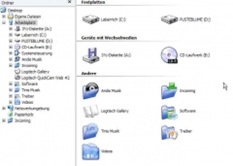
The screenshot shows some shell folders on a Windows XP system. You can browse through their subdirectories on the left side of the view, or you can double-click on the right side. They behave in the exact same way as the "My Documents" folder. With the shell object editor, you can create as many of those shell folders as you want, although we recommend only choosing the folders you use most.
But there are more shell objects. The Internet Explorer, that resides on your desktop by default, is a shell object, too. It is not a shortcut because it has not the typical shortcut arrow. The Internet Explorer is a delete-able shell object, but you can create shell objects that are impossible to delete. This may sound like nonsense to you, but it is useful in some rare cases and such objects can be created with this editor.
Installation
Download the installer and run it. A program group will be created and optionally an icon in your control panel.
When you run the program, a list will appear that is initially empty. It will contain all the shell objects that you create with this editor later. Click the "Create" button to start the wizard which will guide you through the creation process.
If you select one or more shell objects in the list, clicking the delete button will be remove the shell objects immediately. Shell objects that were created by other programs, by the system or by yourself (using the registry editor) do not show up here for safety reasons. This way you can't trash your system by just clicking the wrong item.
However, if you right-click in the list and select "expert mode", all existing shell objects will appear in the list and you are then able to delete some of them - even the control panel or things like that. You have been warned.
Attention
Note that this program uses some undocumented registry entries to do what it does. You are completely on your own with whatever the results may be. We tried the program on different computers and it works and does no harm, but we don't guarantee anything. We are in no way responsible for the results.
So the annoying desktop icons cannot bother you any more. If you were also missing the “My Documents” icon on the desktop of Windows Vista you can tweak the settings and have it the way you want it to be.
Download Now










 Recuva (pronounced "recover") is a freeware Windows utility to restore files that have been accidentally deleted from your computer. This includes files emptied from the Recycle bin as well as images and other files that have been deleted by user error from digital camera memory cards or MP3 players. It will even bring back files that have been deleted by bugs, crashes and viruses!

